TOP
1.若您選擇ATM轉帳付款方式,訂單完成後,網頁、會員專區及您的訂購函中均會顯示該筆訂單的付款帳號,您需一次付清訂單金額。
If you choose the ATM transfer payment method, the payment account number of the order will be displayed on the webpage, My Account, and your order letter after the order is completed, which requires you to pay the order amount in full at a time.
2.博客來確認款項入帳成功後,商品將寄送至訂單資料上的收件地址。
提醒您,若選擇ATM轉帳付款,日後如遇訂單取消或退貨之情形,轉帳手續費恕無法一併退還給您,請您見諒!!
After Books.com.tw confirms that the payment is received in full, the goods will be sent to the receiving address specified on the order form. If you choose ATM transfer payment, the transfer fee cannot be refunded to you if the order is canceled or returned in the future. We are sorry for any inconvenience this may have caused you!
※您需持有台灣地區銀行發行之銀行金融卡,於繳款期限內至「ATM提款機」、「網路 ATM 」或「網路銀行」依指定帳號進行轉帳繳款,請勿使用臨櫃匯款方式。
※You need to hold a bank financial card issued by a bank in Taiwan to transfer money to an automated teller machine or online ATM. Please do not use the Over-the-Counter Remittance.
TOP
若會員選擇「ATM轉帳」付款方式,於訂購完成後,網頁、「會員專區」及訂購函中均會顯示該筆訂單的付款帳號,若您未保留此資料,請您可至「會員專區」-「信件備份」中查詢您的訂購函,函中將詳列您的轉帳金額及付款帳號。
f the member chooses the payment method of "ATM Transfer", the payment account number of the order will be displayed on the webpage, "My account", and the order letter after the order is completed. If you have not kept this information, please check your order letter in "My account"Letter Backup". The letter will detail your transfer amount and account number for the payment.
TOP
博客來的付款帳號每筆訂單均不相同,每當會員完成一筆訂單後,系統即會產生該訂單的付款帳號,當款項入帳號,系統將自行沖銷至您的訂單中,您毋需再與我們確認。此外,您亦可登錄「會員專區」查詢您的訂單處理狀況。
提醒您,若選擇ATM轉帳付款,日後如遇訂單取消或退貨之情形,轉帳手續費恕無法一併退還給您,請您見諒!!
The payment account of Books.com.tw is different for each order. Every time a member completes an order, the system will generate a payment account for that order. When we receive your payment, the system will automatically write it off to your order, and you do not need to confirm with us again. In addition, you can also log in to the "My account" to check the processing status of your order.We are here to remind you that if you choose to pay via ATM transfer, the transfer handling fee will not be refunded to you if the order is canceled or returned in the future. We are sorry for any inconvenience this may have caused you!
TOP
由於銀行作業時間為週一至週五(不包含例假日),早上9:00至下午3:30,若您已過作業時間轉帳,則款項將於次個工作日下午才會入帳,待銀行入帳後才可於博客來「會員專區」中確認。
若您在付款後2個工作日仍收到博客來的「未付款通知」,或在「會員專區」中訂單狀態仍顯示待付款,請先確認此筆付款是否成功,若確認無誤,請將轉帳單據傳真至博客來,並註明訂單編號、姓名及聯絡方式,我們將請相關人員為您查詢及處理。 博客來傳真電話:02-77116711
As the bank operation time is from Monday to Friday (excluding holidays), from 9:00 am to 3:30 pm, if you have passed the working time for the transfer, the payment will not be credited until the afternoon of the next working day, and will be confirmed in the Books.com.tw " My account"after the bank has credited it.
If you still receive the "Non-Payment Notification" from Books.com.tw within 2 working days after the payment, or the order status still shows pending payment in the "My Account", please confirm whether the payment is successful in advance. If the paymnet is confirmed, please fax the transfer receipt to Books.com.tw and indicate the order number, name, and contact information so that we can ask relevant personnel to inquire and deal with it for you.
Fax Number of Book Your Life: 02-77116711
TOP
使用「ATM轉帳」其付款金額需與訂單金額相符,若溢繳或付款金額不足,都會造成無法成功轉帳,或款項無法沖銷的情形,因此請依每筆訂單的金額分別轉帳。
When using "ATM Transfer", the payment amount must be consistent with the order amount. Overpayment or underpayment will result in failure to transfer successfully or the payment cannot be written off,. Therefore, please transfer separately according to the amount of each order.
TOP
若您轉帳時出現錯誤訊息,請先確認付款金額與訂單總金額是否相符,及輸入的帳號是否正確,若確認無誤但仍無法成功轉帳,可能是由於某些自動櫃員機程式未更新,尚無法接受16碼的轉帳帳號,煩請您可換一台自動櫃員機試試看。
If you receive an error message when making an ATM transfer, please confirm whether the payment amount matches the total order amount and whether the account number entered is correct. If the confirmation is correct but the ATM transfer is still not successful, it may be because some ATM programs have not been updated and the 16-digit transfer account cannot be accepted. Please try another ATM instead.
TOP
由於系統僅會針對未入帳的訂單保留1天(24小時),若會員未在此時間內完成轉帳,系統將會自動取消訂單。但若您已付款成功,因訂單已取消,此金額將直接轉至會員帳戶餘額中,煩請重新下一筆訂單,訂購時將直接抵扣。您亦可選擇透過會員專區填寫「結清帳戶申請表格」,將款項轉至銀行帳戶。
Since the system will only reserve the unpaid order for 1 day (24 hours), the system will automatically cancel the order if the member does not complete the transfer within the time limit. But if you have paid successfully, the amount will be directly transferred to the balance of your member account because the order has been canceled. Please place another order so that it will be directly deducted when ordering. You may also choose to fill in the "Account Settlement Application Form" through the member area to transfer the amount to your bank account.
提醒您,若選擇ATM轉帳付款,日後如遇訂單取消或退貨之情形,轉帳手續費恕無法一併退還給您,請您見諒!!
We are here to remind you that if you choose to pay via ATM transfer, the transfer handling fee will not be refunded to you if the order is canceled or returned in the future. We are sorry for any inconvenience this may have caused you!
TOP
只要商品未出貨,會員都可自行至「會員專區」中進行取消。款項將退至會員帳戶餘額中,您可以選擇保留此金額,待下次訂購時抵扣;亦可選擇透過會員專區填寫「結清帳戶申請表格」,將款項轉至銀行帳戶。
As long as the goods have not been shipped, members can go to the "My account" to cancel by themselves. The amount will be refunded to the balance of the member account so that you may either choose to keep this amount and deduct it during your next order, or you may also choose to fill in the "Account Settlement Application Form" in the member area to transfer the amount to your bank account.
提醒您,若選擇ATM轉帳付款,日後如遇訂單取消或退貨之情形,轉帳手續費恕無法一併退還給您,請您見諒!!
We are here to remind you that if you choose to pay via ATM transfer, the transfer handling fee will not be refunded to you if the order is canceled or returned in the future. We are sorry for any inconvenience this may have caused you!
TOP
由於不同的付款方式分別是採用不同的作業系統,目前未提供您直接更改付款方式的服務。若您欲更改付款方式,煩請先於「會員專區」中取消原訂單,或來電來函客服人員為您取消原訂單後,另外重新訂購即可。
Since different payment methods adopt different operating systems, there is currently no service for you to switch to another payment method directly. If you want to switch to another payment method, please cancel the original order in the "My account" first, or call the customer service staff to cancel the original order for you before you place an order all over again.
TOP
步驟一:準備好您的轉帳資訊、晶片金融卡與網路讀卡機。
(請留意博客來提供的轉入帳號為16碼虛擬帳號,專屬於您的訂單)
Prepare your transfer information, chip credit card, and online card reader (please note that the transfer account provided by Book Your Life is a 16-code virtual account, which is exclusive to your order).
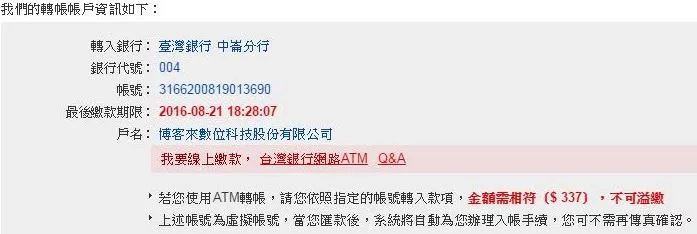
步驟二:透過轉帳資訊中「我要線上繳款,臺灣銀行網路ATM」可連結至臺灣銀行網路ATM,首先輸入晶片金融卡密碼並點擊「確認」。
Connect to Bank of Taiwan Online ATM through "I want to pay online via Bank of Taiwan Online ATM" in the transfer section. First, enter the chip credit card password and click "Confirm".

步驟三:密碼驗證完成後,將自動出現繳款資訊。請選擇您的付款帳號,再點擊右下角「下一步」。
After the password verification is completed, payment information will appear automatically. Please select your payment account and click "Next" on the lower right corner.

若您的電腦未順利出現以上繳款資訊,請直接於左方選單,選擇「繳稅費卡款」→「其他繳費」→「網路書店─博客來」 輸入轉入帳號(銷帳編號)及繳費金額後,再按右下角「下一步」。
If the above payment information does not appear on your computer, please go to the menu on the left and select the "Tax Payment Card"→"Other Payment"→"Online Books.com.tw" and enter the transfer account number (A/C ) as well as the payment amount. Afterward, you may click "Next" on the lower right corner.


步驟四:再次輸入晶片金融卡密碼及網頁上顯示的交易驗證碼,並點擊右下角「啟動轉帳交易」。
Re-enter the chip credit card password and the transaction verification code displayed on the webpage. Click "Initiate transfer transaction" on the lower right corner.

步驟五:確認交易資料後,重新插入晶片卡,點選「確認」繼續進行交易。
After confirming the transaction information, reinsert the chip credit card and click "Confirm" to continue with the transaction.

步驟六:確認您的繳費已完成。
Confirm that your payment has been completed.

博客來數位科技股份有限公司 統編 : 96922355 地址:臺灣 114063台北市內湖區石潭路159號3樓 食品業者登錄字號:A-196922355-00000-9
Copyright © since 1995 books.com.tw All Rights Reserved.



 天天爆殺
天天爆殺  今日66折
今日66折  博客來
博客來 博客來
博客來 博客來
博客來 博客來
博客來 博客來
博客來 常見問題
常見問題 線上客服
線上客服 寫信給客服
寫信給客服